

General
Page title support
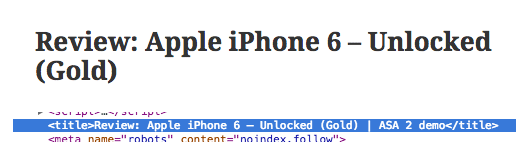
This enables the use of ASA2 shortcodes in page titles. For example, create a template that only contains the placeholder {{ Title }} and call it "product_title". You can use this template, to include the product name in the page title. ASA2 will also take care of the page's slug and meta title for SEO friendly URLs:

SEO plugins support
Activate this option to be able to use ASA2 shortcodes in SEO plugins. Then you can use shortcode in meta title and description fields.
Currently supported SEO plugins are:
- WordPress SEO by Yoast
With WordPress SEO you can use shortcodes in the SEO title field:

Render in RSS Feeds
By default, ASA2 placeholders do not get rendered in your site's RSS feeds. If you want that, activate this option.

ASA 1 support
If you were using ASA 1 before on your site, you might want ASA2 to handle ASA 1 contents. Activating this option, let's ASA2 handle all ASA 1 shortcodes, widgets and PHP function. You should use the Migration Wizard when upgrading from ASA 1.

ASA 1 default template
By default, the ASA2 default template will be used to render ASA 1 [asa] shortcode without declaration of a custom template. If you want ASA2 to use the old ASA 1 default template in that case, activate this option.

Hide editor button
With this option set, you can hide the ASA2 editor button in the WP default post editor.
Backend in English
By activating this option, the ASA2 backend will always be loaded in English, no matter which default language is configured in the WP settings.