

Settings
The Settings page is organised into three cards: Activation, General, and Cache backend. Use the Save changes button in the top right to persist your edits — unsaved changes are kept until you navigate away.
Activation
| Setting | Description | Default |
|---|---|---|
| Activate Image Proxy | Routes external product images through this server. When off, images load directly from their origin and expose visitor IPs. | Off |
| Also apply in WP admin | Enables the proxy for pages rendered inside /wp-admin. Most setups only need it on the frontend. Disabled while the master switch is off. | Off |
Linking to this page from the Dashboard activation banner anchors directly to this card and briefly highlights it so the onboarding path is obvious.
When you change either activation toggle and save, the ASA2 template cache is flushed automatically. This avoids a window during which cached HTML still contains stale image URLs (origin URLs after turning the proxy on, or proxy URLs after turning it off). The flush only triggers when the activation flag actually flipped — saving the page with the toggles unchanged does not flush the cache, and other settings on this page (cache backend, lifetime, URL slug) never trigger it.
The success banner reflects what happened:
Settings saved. ASA2 template cache flushed because activation changed.
Or, when the activation toggles were not changed:
Settings saved.
General
| Setting | Description | Default |
|---|---|---|
| Use cache | Turn caching on or off. When off, every proxy request goes through the full pipeline (fetch → decode → encode) and the origin is contacted every time. Only useful for debugging. | On |
| Cache lifetime (minutes) | How long a cache entry remains valid before the proxy refetches the image from the origin. Stored as an integer. | 360 (6 hours) |
| URL slug | Used as the last path segment of proxy URLs (e.g. https://example.com/asa2img/…). Letters, digits, and hyphens only. Changing this invalidates all previously emitted URLs until pages are re-rendered. | asa2img |
Cache backend
The plugin detects which cache backends are available on this server at runtime. The card opens with an Available backends on this server panel that lists every backend with a green check (supported) or grey minus (not available) and tags the currently selected one.

Cache mode
Pick one of three backends. See Cache Backends for a deeper comparison of when to pick which.
Filesystem
The default backend — works on any host.
| Field | Description |
|---|---|
| Filesystem directory | Absolute path where cached images are stored. Defaults to the system temp directory. Must live under either wp-content or the system temp directory — other paths are rejected with "Cache directory must live under wp-content or the system temp directory." |
A validity badge below the field reports the live state:
- Green — Directory exists and is writable.
- Red — Directory is not writable — falls back to NullCache.
Redis
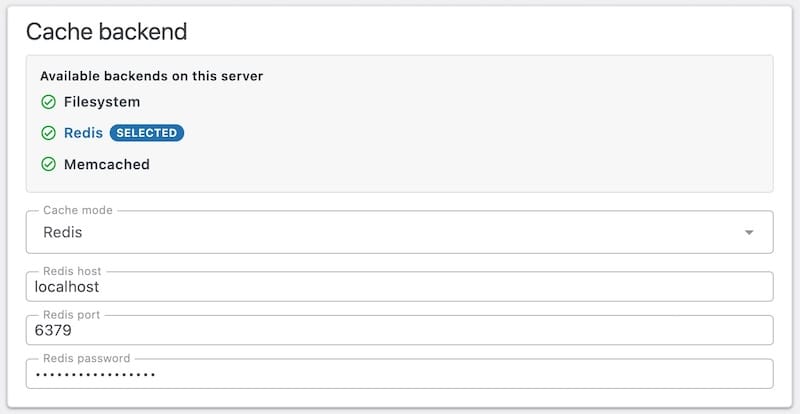
Hidden unless the phpredis PHP extension is loaded. If you select Redis on a host without the extension, a yellow alert appears: "The Redis PHP extension is not installed on this server." In that state the pipeline falls back to NullCache and nothing is cached.
| Field | Default | Notes |
|---|---|---|
| Redis host | 127.0.0.1 | Hostname or IP address of the Redis server. |
| Redis port | 6379 | TCP port. |
| Redis password | empty | When a password is already stored, the field shows the placeholder (stored — leave blank to keep). Submit blank to keep the existing value; submit an empty string explicitly to clear it. The current value is never returned by the REST API. |
Memcached
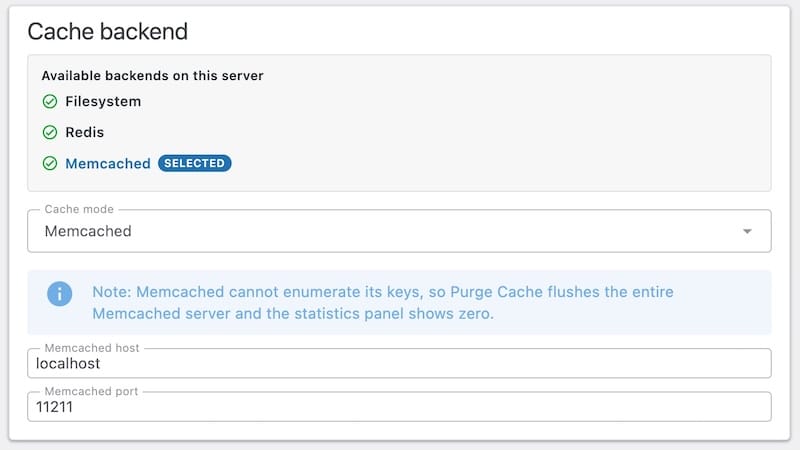
Hidden unless the ext-memcached PHP extension is loaded. If unsupported, the same yellow alert pattern applies.
| Field | Default |
|---|---|
| Memcached host | 127.0.0.1 |
| Memcached port | 11211 |
Memcached caveat
Memcached cannot enumerate its keys, so Purge Cache flushes the entire Memcached server (including data unrelated to the proxy) and the statistics panel shows zero entries and zero bytes. Use Memcached only when you understand this trade-off — for shared Memcached instances, prefer Redis or Filesystem.