

Multi-Marketplace Configuration
The Creators API in ASA2 supports a multi-marketplace architecture. This allows you to configure separate API credentials for each Amazon marketplace (country store).
Why Separate Credentials?
The Creators API requires you to create credentials for each marketplace separately in Amazon Associates Central. ASA2 mirrors that: one entry per marketplace, each with its own tracking ID, which you can enable or disable individually.
Managing Multiple Marketplaces

The Configured Marketplaces table shows all your configured marketplaces at a glance:
Marketplace — The country name (e.g., Germany, USA, United Kingdom).
Enabled — Shows Enabled (green) or Disabled (gray). This reflects the "Enable Marketplace" checkbox from the credential form and nothing else: it is a configuration flag, not a confirmation that the credentials work. Products from a disabled marketplace are not updated.
Connection — The result of the last connection test for this marketplace:
- Not tested yet (gray) — the connection has never been tested since the credentials were saved
- Connected (green) — the last test successfully reached Amazon with these credentials
- Failed (red) — the last test failed; hover over the badge to see the message returned by Amazon
The date and time of the last test is shown below the badge. Use Test Connection in the Actions column to run a fresh test at any time.
Credential Type — Indicates whether the marketplace uses Cognito (v2) or LWA (v3) credentials.
API Version — The Creators API version being used (e.g., 2.2, 3.1). This is automatically determined based on the credential type and marketplace region.
Partner Tag — Your Amazon Associates Tracking ID for this marketplace. Partially hidden for security.
Default — A star icon indicates the default marketplace. This marketplace is used when no specific country is selected.
Actions
- Edit: Modify the credentials or settings
- Test Connection: Run a live connection test against Amazon for this marketplace and update the Connection column with the result
- Delete: Remove the marketplace configuration
WARNING
Saving marketplace credentials does not test them. The Enabled column only reflects the checkbox from the credential form. Use Test Connection to confirm the credentials actually work.
Adding a Marketplace
- Click the "+ Add Marketplace" button
- Select the marketplace from the dropdown
- Select the Credential Type — choose "Cognito (v2)" for existing credentials or "LWA (v3)" for credentials issued since February 2026
- Enter your Credential ID and Credential Secret
- Enter your Partner Tag (Tracking ID) for this marketplace
- Check "Enable Marketplace" to activate it
- Optionally check "Set as Default Marketplace"
- Click "Add Marketplace"
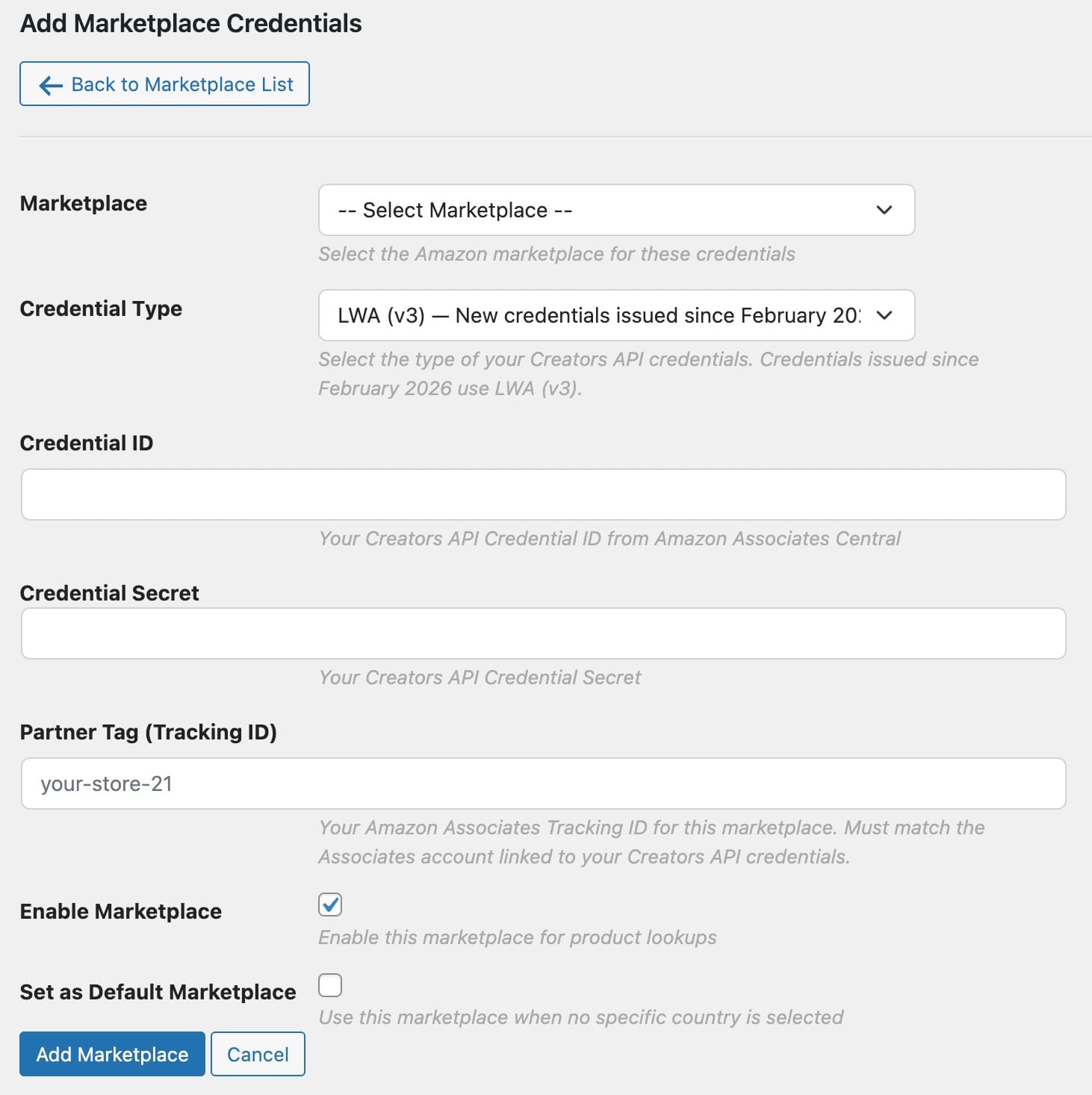
Setting a Default Marketplace
The default marketplace is used when:
- No specific country code is provided in a shortcode
- A product's country cannot be determined
- You're using features that don't specify a marketplace
To set a default marketplace:
- Click "Edit" on the desired marketplace
- Check "Set as Default Marketplace"
- Save the changes
Only one marketplace can be the default. Setting a new default automatically removes the default status from the previous one.
Enabling and Disabling Marketplaces
You can temporarily disable a marketplace without deleting its credentials:
- Click "Edit" on the marketplace
- Uncheck "Enable Marketplace"
- Save the changes
When a marketplace is disabled:
- Products from that marketplace are no longer updated. ASA2 shows a message asking you to enable the marketplace
- The credentials remain stored and can be re-enabled later
- Other marketplaces are unaffected
This is useful for troubleshooting issues with a specific marketplace, or for pausing it while you sort out its credentials.
Testing a Marketplace Connection
To verify that a marketplace's Creators API credentials actually work, click "Test Connection" in the Actions column for that marketplace and confirm the dialog.
ASA2 then sends a minimal live search request to Amazon using the stored credentials for that marketplace and records the outcome in the Connection column:
- Connected — the credentials are valid and Amazon accepted the request
- Failed — the request failed. Hover over the red badge to see the message, for example invalid credentials, an Associates account that is not linked, or a rate-limit response from Amazon
The result and the timestamp of the test stay in the Connection column until you run the test again.
You can test a marketplace regardless of whether it is currently enabled. This lets you verify new credentials before switching the marketplace on.

TIP
If the badge reads Failed with the message that the credentials are valid but the request was rate limited, the credentials themselves are fine. Amazon throttled this particular request — wait a moment and test again.
Which Marketplaces Deliver Product Data
Before ASA2 loads product data, it looks up the credentials for the marketplace (country code) of that product:
| Marketplace | Credential Type | Enabled | Result |
|---|---|---|---|
| Germany | Cognito (v2) | Enabled | Product data is loaded (Creators API 2.2) |
| United States | LWA (v3) | Enabled | Product data is loaded (Creators API 3.1) |
| United Kingdom | Cognito (v2) | Disabled | No update — ASA2 asks you to enable the marketplace |
| France | — | Not configured | No update — ASA2 asks you to add credentials |
You can therefore build up your configuration marketplace by marketplace. The products of a marketplace you have not configured yet stay exactly as they are until you add its credentials.
Related Topics
- Creators Api Setup - Initial setup guide
- Creators Api Migration - Migrating from PA API 5.0
- I18N - Internationalization features
- Associate Id Sets - Managing Associate IDs for PA API