

Main Offers
The following placeholders are related to the main offer information, including main prices, sale prices, savings, and special deals. These represent the primary offer data from Amazon or custom shops.
OffersMainPriceAmount
The item's main price without currency.
Example: Referring to the Placeholders Price Example Product Screenshot:
47.67INFO
In case a product has variations, {{ OffersMainPriceAmount }} contains the price range of all variations (see Placeholders Variations).
Example output of a price range referring to the Placeholders Price Variations Screenshot:
19.99 - 55.00OffersMainPriceInteger
The main offer price as an integer (without decimal mark) including the decimal places. Best used for calculations.
Example: Referring to the Placeholders Price Example Product Screenshot:
4767OffersMainPriceCurrencyCode
The main price currency code.
Example: Referring to the Placeholders Price Example Product Screenshot:
USDOffersMainPriceFormattedPrice
The item's formatted main price including amount and currency.
Example: Referring to the Placeholders Price Example Product Screenshot:
$47.67INFO
In case a product has variations, {{ OffersMainPriceFormattedPrice }} contains the price range of {{ VariationsOffer }} (see Placeholders Variations).
Example output of a formatted price range referring to the Placeholders Price Variations Screenshot:
$19.99 - $55.00OfferAmountSaved
The amount of the difference between the list price and the actual price without currency.
Example: Referring to the Placeholders Price Example Product Screenshot:
12.32OfferAmountSavedInteger
The amount saved compared to the list price as an integer (without decimal mark) including the decimal places. Best used for calculations.
Example: Referring to the Placeholders Price Example Product Screenshot:
1232OfferAmountSavedCurrencyCode
The currency code of the saved amount.
Example: Referring to the Placeholders Price Example Product Screenshot:
USDOfferAmountSavedFormattedPrice
The item's formatted saved amount including amount and currency.
Example: Referring to the Placeholders Price Example Product Screenshot:
$12.32OfferSalePriceAmount
The item's sale price without currency.
Example: Available when the product has a special sale price.
42.99OfferSalePriceInteger
The item's sale price as an integer (without decimal mark) including the decimal places. Best used for calculations.
Example:
4299OfferSalePriceCurrencyCode
The item's sale price currency code.
Example:
USDOfferSalePriceFormattedPrice
The item's sale price with currency code.
Example:
$42.99OfferAvailability
A textual note about the availability of the product, e.g. "Usually ships in 24 hours".
Example:
Usually ships in 24 hoursOfferIsPrime
If the product is available with Amazon Prime (boolean true / false).
Example:
{% if OfferIsPrime %}<img src="path/to/my/img/prime.png">{% endif %}OfferPercentageSaved
An integer value of the percentage saved.
Example: Referring to the Placeholders Price Example Product Screenshot:
21This is an example of a conditional usage, it will only show the percentage saved if it is available:
{% if OfferPercentageSaved is not empty %}{{ OfferPercentageSaved }}% saved{% endif %}OfferDealBadge
Contains marketing badges that visually identify special Amazon offers like "Prime Day Deal" or "Lightning Deal". This placeholder is only available for Amazon products and displays promotional badges provided by Amazon's Product Advertising API.
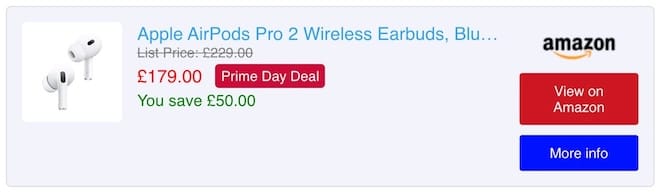
Example output:
- "Prime Day Deal"
- "Lightning Deal"
- Other promotional badges from Amazon
Availability:
- Amazon products only (requires PA API 5.0)
- Only when Amazon provides deal badge data
- Not available for custom shop products
Example: Template usage:
{% if OfferDealBadge is not empty %}
<span class="asa2-offer-deal-badge">{{ OfferDealBadge }}</span>
{% endif %}
Styling example:
.asa2-offer-deal-badge {
    background-color: #CC0C39;
    color: white;
    padding: 4px 6px;
    margin-left: 8px;
    border-radius: 4px;
    font-size: 14px !important;
    vertical-align: top;
}
INFO
This feature was introduced in ASA2 version 1.27.0 as part of the enhanced Amazon special offer prices support.
IsFreeShippingEligible
Boolean value indicating whether the product is eligible for free shipping. This is typically true for Prime-eligible products or when the order meets minimum requirements for free shipping.
Example:
{% if IsFreeShippingEligible %}
<span class="free-shipping-badge">Free Shipping</span>
{% endif %}
IsAmazonFulfilled
Boolean value indicating whether the product is fulfilled by Amazon (FBA - Fulfilled by Amazon). This means Amazon handles storage, packaging, and shipping of the item.
Example:
{% if IsAmazonFulfilled %}
<span class="amazon-fulfilled">Fulfilled by Amazon</span>
{% endif %}