

Renderer
This page contains information about ASA2 PHP functions you can use in your WordPress theme templates to manually render the output from ASA2's Shortcodes.
Asa2_Renderer_Asin::render
Deprecated Asa2_Renderer_Asin::render
Use Php Function Asa2 Render Asin instead.
asa2_render_product
With this function you can render single products based on the product ID like shortcode Shortcodes Asa2 would do.
API documentation
Check the API documentation page for more details.
Description
echo asa2_render_product($id [, array $options]) {Parameters
id The ID of the product you want to render. You find the ID in ASA2's products section
options An array of Shortcodes Asa2 Options (same as for the Shortcodes Asa2 shortcode).
- `ajax` Set to 1 activate the AJAX mode
- `country_code` The template ID
- `no_cache` Set to 1 to bypass the cache
- `tpl` The template name
- `tplid` The template ID
- `tracking_id` Custom tracking ID
Examples
echo asa2_render_product(123, [
    'tpl' => 'my_custom_template'
]);
asa2_render_asin()
With this function you can render single products based on an ASIN like shortcode Shortcodes Asa2 would do.
API documentation
Check the API documentation page for more details.
Description
<?php
echo asa2_render_asin( $asin [, array $options] );
Parameters
asin The ASIN of the product you want to render
options An array of Shortcodes Asa2 Options (same as for the Shortcodes Asa2 shortcode).
- `ajax` Set to 1 activate the AJAX mode
- `country_code` The template ID
- `no_cache` Set to 1 to bypass the cache
- `tpl` The template name
- `tplid` The template ID
- `tracking_id` Custom tracking ID
Examples
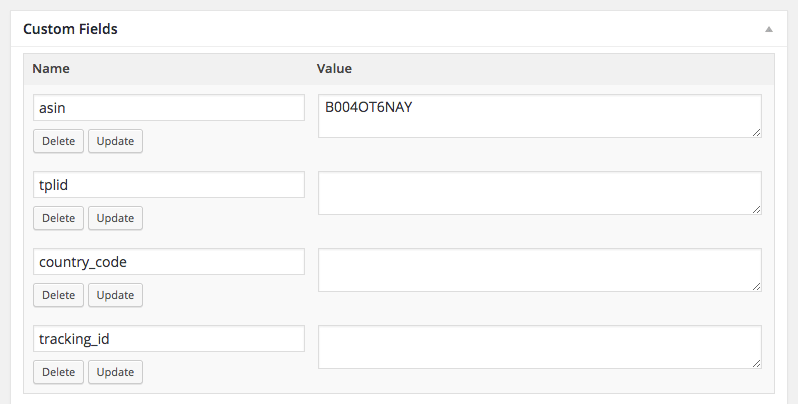
This code snippet can be used in a page template to render a product based on an ASIN from a custom field. Additionally the code checks for other optional custom fields where you could define a custom template, country code or tracking ID.
<?php
// get ASIN from custom field "asin"
$asin = get_post_meta($post->ID, 'asin', true);

if (!empty($asin)) {

    $tplid = get_post_meta($post->ID, 'tplid', true);
    $country_code = get_post_meta($post->ID, 'country_code', true);
    $tracking_id = get_post_meta($post->ID, 'tracking_id', true);

    // populate the options array
    $options = array();
    if (!empty($tplid)) {
        $options['tplid'] = $tplid;
    }
    if (!empty($country_code)) {
        $options['country_code'] = $country_code;
    }
    if (!empty($tracking_id)) {
        $options['tracking_id'] = $tracking_id;
    }

    // display the product
    echo asa2_render_asin($asin, $options);
}
Asa2_Renderer_Collection::render
Deprecated Asa2_Renderer_Collection::render
Use Php Function Asa2 Render Collection instead.
asa2_render_collection()
With this method you can render a collection like shortcode Shortcodes Asa2 Collection would do.
API documentation
Check the API documentation page for more details.
Description
<?php
echo asa2_render_collection( $collection [, array $options] );
Parameters
collection The collection name or ID
options An array of Shortcodes Asa2 Collection Options (same as for the Shortcodes Asa2 Collection shortcode).
- `limit` Limits the amount of collection items
- `no_cache` Set to 1 to bypass the cache
- `orderby` To order the items (see [Shortcodes Asa2 Collection Option Orderby](shortcodes_asa2_collection#orderby))
- `order` The order direction
- `s` A search string
- `tpl` The template name
- `tplid` The template ID
Examples
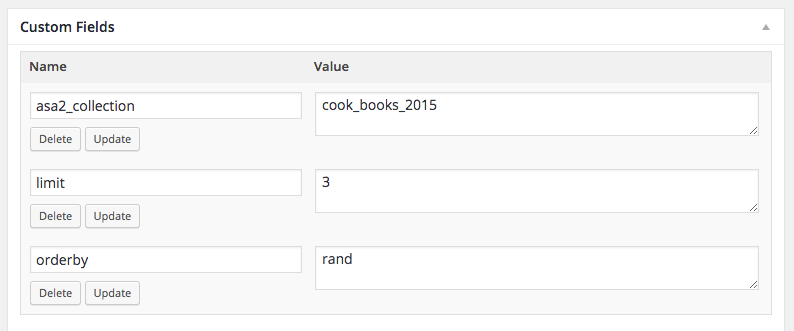
This code renders a collection based on a custom field named "asa2_collection". If a collection name or ID was entered, the options array will be build based on other custom fields and the collection will be rendered.
<?php
// get collection name from custom field
$asa2_collection = get_post_meta($post->ID, 'asa2_collection', true);

if (!empty($asa2_collection) && asa2_collection_exists($asa2_collection)) {

    $tplid = get_post_meta($post->ID, 'tplid', true);
    $limit = get_post_meta($post->ID, 'limit', true);
    $orderby = get_post_meta($post->ID, 'orderby', true);
    $order = get_post_meta($post->ID, 'order', true);

    // populate the options array
    $options = array();
    if (!empty($tplid)) {
        $options['tplid'] = $tplid;
    }
    if (!empty($limit)) {
        $options['limit'] = $limit;
    }
    if (!empty($orderby)) {
        $options['orderby'] = $orderby;
    }
    if (!empty($order)) {
        $options['order'] = $order;
    }

    // display the collection
    echo asa2_render_collection($asa2_collection, $options);
}
Asa2_Module_Repo_Renderer_SmartCollection::render
Deprecated Asa2_Module_Repo_Renderer_SmartCollection::render
Use Php Function Asa2 Render Smart Collection instead.
asa2_render_smart_collection()
Use this method to dynamically create a ASA2 smart collection in your PHP code like shortcode Shortcodes Asa2 Smart Collection would do.
API documentation
Check the API documentation page for more details.
Description
<?php
echo asa2_render_smart_collection( $options );
Parameters
options An array of Shortcodes Asa2 Smart Collection Options (same as for the Shortcodes Asa2 Smart Collection shortcode).
- `limit` Limits the amount of collection items
- `no_cache` Set to 1 to bypass the cache
- `orderby` To order the items
- `order` The order direction
- `s` A search string
- `tpl` The template name
- `tplid` The template ID
- `cat` To filter by category
- `tag` To filter by tag
- `rating_gt` Average rating greater than
- `rating_lt` Average rating less than
- `rating_between` Average rating between
- `is_available_main` Only products with main price
- `is_prime` Prime filter
- ... see [Shortcodes Asa2 Smart Collection Options](shortcodes_asa2_smart_collection#options) for all smart_collection options
Examples
In this example an array of smart collection options is manually set and passed to the method. You can use custom fields to dynamically set the options.
<?php
$options = array(
    'cat_slug' => 'games',
    'limit' => 10,
    'is_available_main' => true,
    'is_prime' => true,
    'rating_gt' => 3,
    'orderby' => 'rand',
    'tplid' => 46
);

// display the smart collection
echo asa2_render_smart_collection($options);